Talent Edge

My Role
Lead UX Designer
Duration
3 Month
Responsibilities
Defined the problem with Product Head and stakeholders, led research, validated feasibility and priorities early, and contributed to sprint planning.
Introduction
TalentEdge was built as part of Otomeyt AI’s vision to place high-quality engineers with companies like Infosys, Oracle, and Tech Mahindra etc.
Although Otomeyt AI operates in Singapore and Malaysia, we intentionally launched TalentEdge as an MVP focused only on the India market. The initial opportunity was estimated at ₹68 crores.
More importantly, this was just the starting point—the same AI screening model could later expand beyond engineers to many other roles, unlocking a market nearly 10× larger.
Key Results
By introducing structured, AI-supported screening, recruiters were able to share qualified candidates within 2 days, while client rejection rates dropped from 70% to 35%, indicating stronger candidate–role alignment and more confident.
How did we achieve this? Scroll to explore ↓
What You’ll Explore
Feel free to jump into any section using the clickable breakdown below.



Business Goal
Objective
Since TalentEdge was being built from scratch, I aligned early with leadership stakeholders to define the product’s purpose, risks, and long-term direction before starting design exploration.

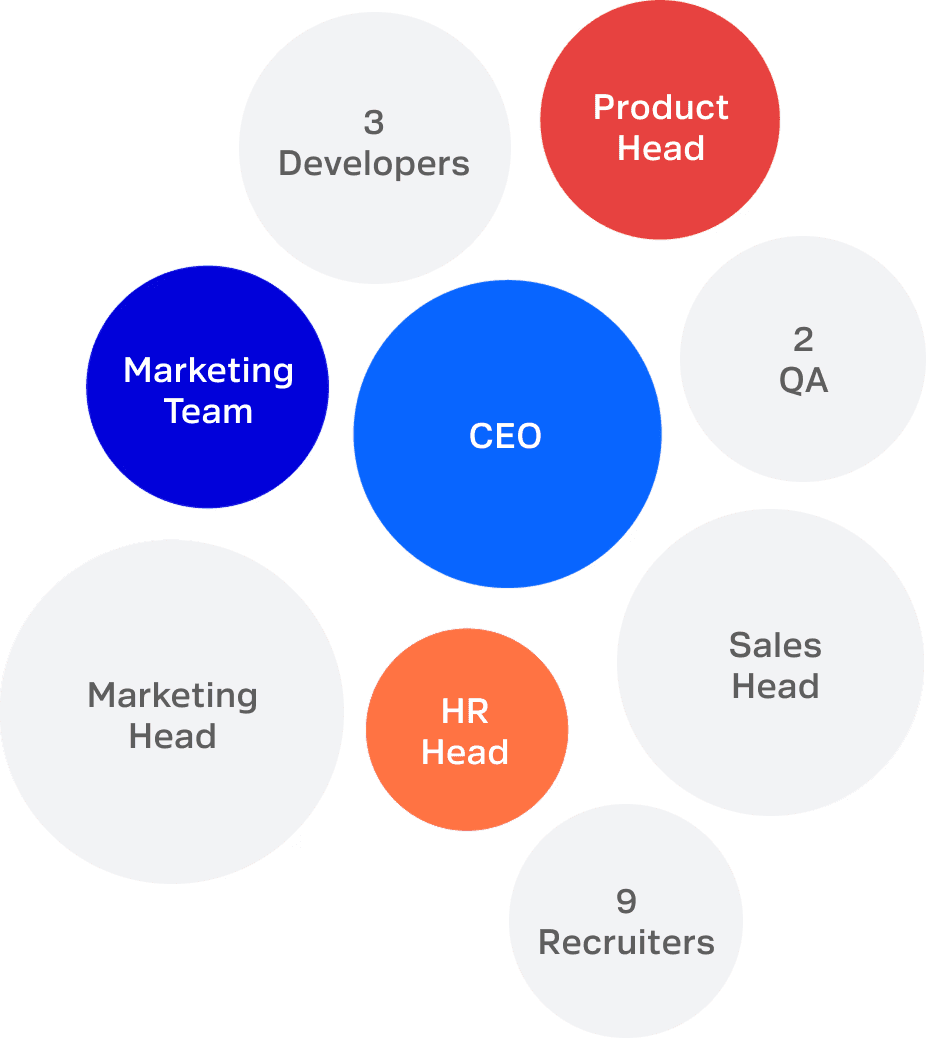
In collaboration with the above teams
I worked closely with:
CEO: To understand placement-level business risks and differentiation opportunities
Product Head : To evaluate feasibility and responsible use of AI in screening workflows
Sales Head: To understand client expectations and why submitted candidates get rejected
Marketing & HR leaders: To identify positioning gaps and recruiter capability challenges
Recruiters: To understand real screening pressures and hesitation around technical decision-making
These conversations helped clarify three foundational elements.
Purpose
Support recruiters in making stronger early-stage technical screening decisions without requiring them to become technical experts.

Vision
Reduce downstream candidate rejection by improving evaluation clarity at the recruiter screening stage.
Strategic Priorities Defined with Leadership
◍ Improve screening accuracy before client submission
◍ Increase recruiter confidence during technical filtering
◍ Enable structured candidate justification for client conversations
◍ Avoid introducing additional workflow complexity
Clarifying What Success Looks Like
◍ Reduction in rejection after recruiter screening
◍ Faster candidate submission timelines
◍ Improved recruiter confidence during evaluation
◍ Higher client acceptance of submitted candidates
Success Metrics
I converted these success goals into trackable metrics.
● Post-screening rejection rate
● Candidate submission time
● Recruiter decision confidence
● Client acceptance rate
Alignment Outcome
Across stakeholders, one direction became clear:
TalentEdge should function as a decision-support layer inside recruiter workflows, not as a replacement screening system or standalone technical evaluation tool.
This alignment shaped the experience strategy before research and solution exploration began.
MVP Scope
what should be built for the MVP versus what could be deferred to future of V2.
we evaluated decisions based on three factors: impact on screening quality, contribution to recruiter confidence, and feasibility within the MVP timeline.
What We Prioritized (Must to have)
◍ Supporting recruiters in understanding candidate relevance to job expectations
◍ Providing structured, explainable evaluation outputs
◍ Enabling faster and more confident candidate submissions
What We Deferred (V2)
◍ Fully guided or structured interview flows across end-to-end hiring stages
◍ Enabling actions like initiating calls directly within the platform
Design Strategy
Since TalentEdge was built from scratch, the early stage of the project was highly ambiguous.
Before defining features or solutions, I created a design strategy to connect leadership goals with experience direction and identify where the product should create impact.
Critical unanswered questions such as:
Where should this product create impact?
Which assumptions needed validation?
How should design contribute to reducing rejection rates?
What knowledge gaps must be resolved before solution decisions?
This created a shared decision-making framework before moving into research.
Business Goal Alignment & (Okr's)
Increase placement success to drive ~ 2–5% revenue growth this year end
Improve quality of submission and confidence in recruiter screening decisions
by reduce client rejection rate from ~ 65–70% → 50% by end of Q3
Supporting signals:
• Improve recruiter confidence during screening
• Reduce submission turnaround time
• Increase client acceptance rate of shortlisted candidates
Strategic Positioning Direction
Based on leadership alignment, the product direction was framed as:
Supporting recruiters during technical candidate screening decisions without increasing workflow complexity
This positioned TalentEdge as a decision-support product inside recruiter workflows rather than a replacement workflow system.
Strategy
Hypothesis
Leadership discussions revealed an important assumption:
Recruiters often rely on resume keywords while clients expect clearer signals of candidate quality before submission.
Based on this, I framed the working hypothesis:
If recruiters receive better support while interpreting candidate relevance during screening, submission quality can improve and downstream rejection can reduce.
This hypothesis guided the investigation plan.
Capability
Direction
(Exploration Scope Defined with Stakeholders)
Before research began, stakeholders aligned on three screening-stage areas where experience intervention might create impact.
These were exploration directions, not solutions:
• Understanding candidate relevance to job expectations
• Supporting recruiter confidence during screening
• Improving clarity while explaining candidate fit to clients
Constraints
Considered Early
Since adoption depended on recruiter workflows, several constraints were identified during strategy framing:
• Recruiters are not technical experts
• Additional tools increase resistance
• Cant change major architecture because exiting calling tools already tie in contract
Knowledge Gaps Identified
Since TalentEdge was a new product initiative, several unknowns existed across stakeholders, users, and the market.
Stakeholder Knowledge Gaps
◍ How recruiters currently evaluate technical candidates
◍ Why submissions fail after screening
◍ Where confidence drops during filtering decisions
User Knowledge Gaps
◍ How recruiters interpret resumes at scale
◍ How do they decide pass vs fail?
◍ What signals recruiters trust while shortlisting candidates
Market Knowledge Gaps
◍ How existing platforms support recruiter-led technical filtering
◍ Where evaluation support gaps exist
◍ What opportunities exist for differentiation
To reduce uncertainty before defining experience directions, I created a staged investigation plan.
Each phase was designed to answer a specific knowledge gap identified earlier.

Phase 1 — Contextual Enquiry
Understand how recruiters currently screen technical candidates

Phase 2 — Competitive Workflow Analysis
Understand how existing platforms support recruiter-led technical filtering and identify opportunity areas

Phase 3 — Validation Planning
Based on findings, validation methods would be selected to test whether identified opportunity areas could realistically support recruiter decision-making.
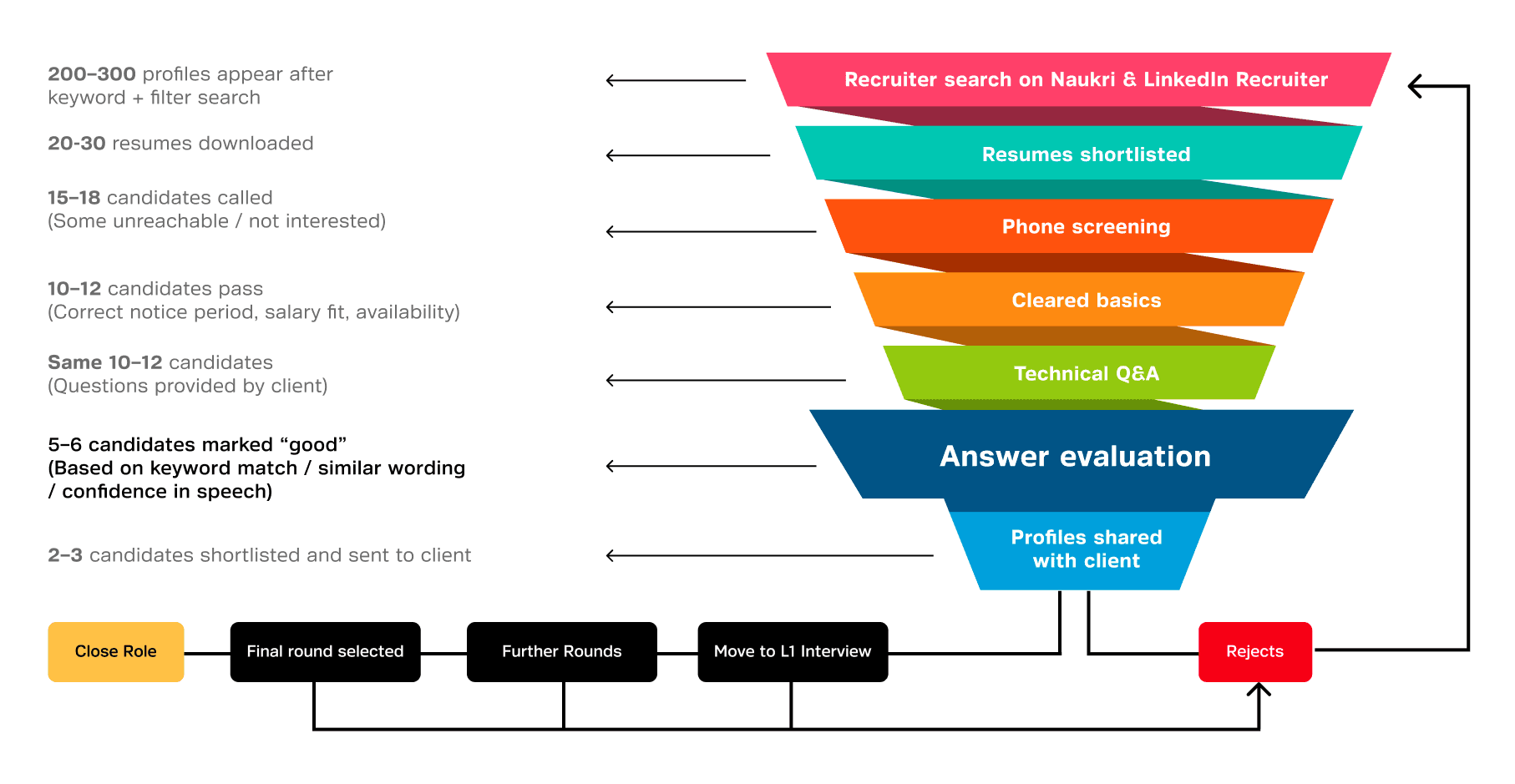
From Contextual inquiry I seen a clean funnel they following as a screening process, From hiring platforms, downloading first 20–30 resumes with filters and calling around 10–12. During these calls, they ask questions from a client-provided question bank and take quick notes. But decisions rarely rely on technical accuracy. Recruiters listen for keywords, judge confidence, and sometimes paste responses into tools like ChatGPT to interpret answers.
Candidates who sound confident or give long explanations are often marked as good—even when recruiters aren’t sure the answer is correct. These shortlisted candidates are then shared with clients. When clients ask for proof of quality, recruiters submit their call notes. If candidates fail the client’s L1 interview, recruiters must quickly find replacements, repeating the same rushed process again.
This revealed a core issue:
The problem wasn’t recruiter effort—it was the system they were forced to work within.


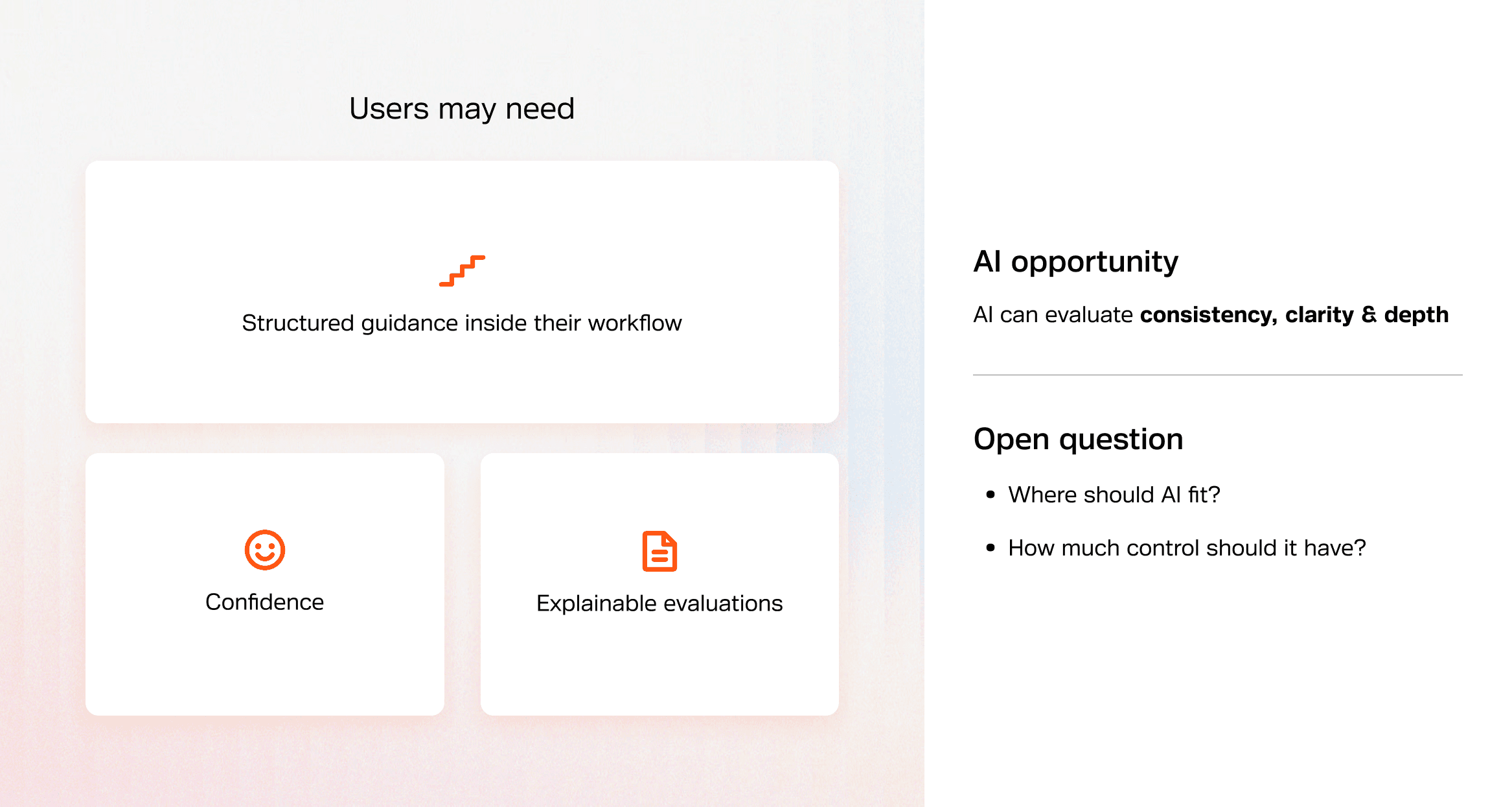
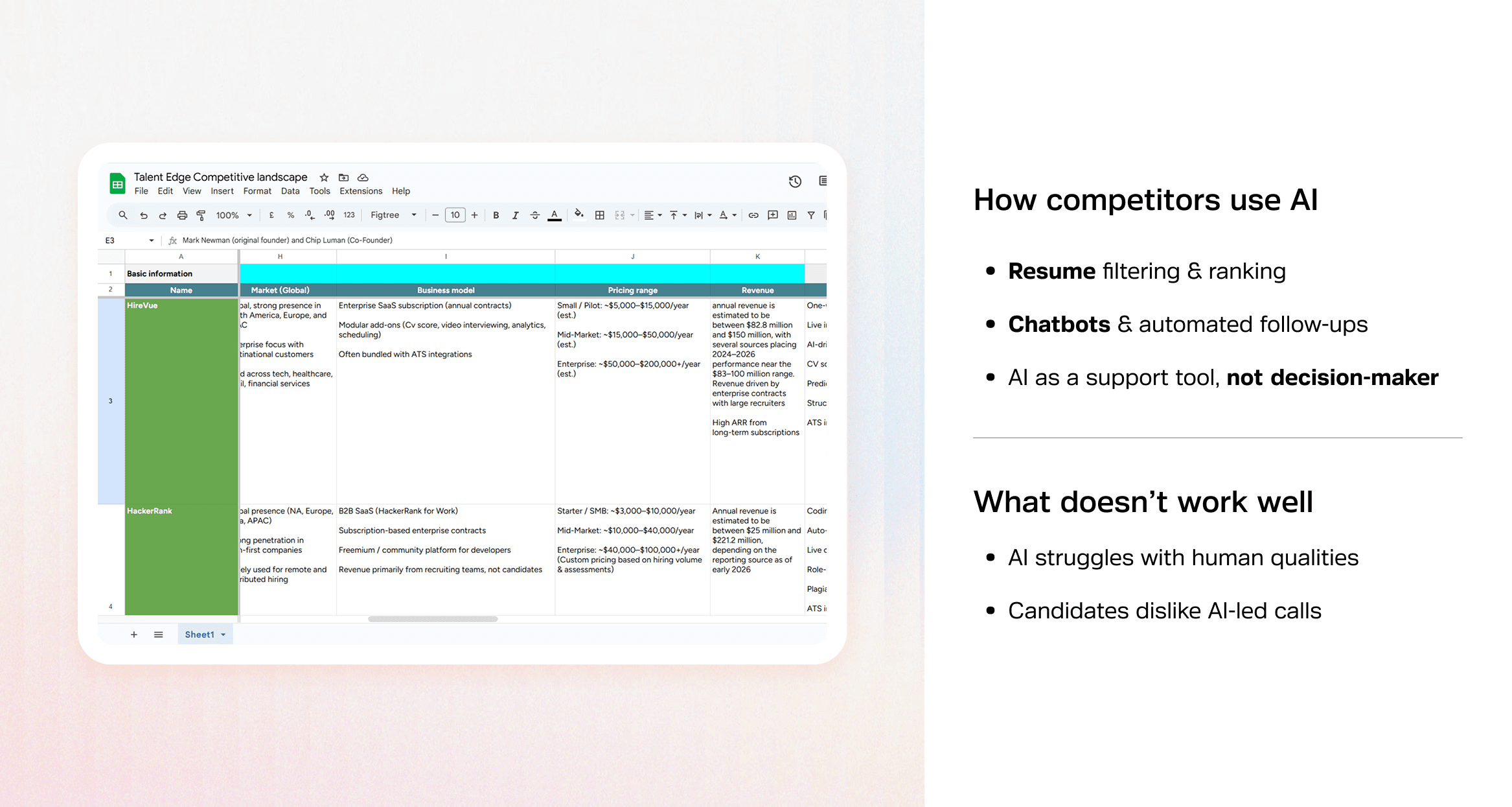
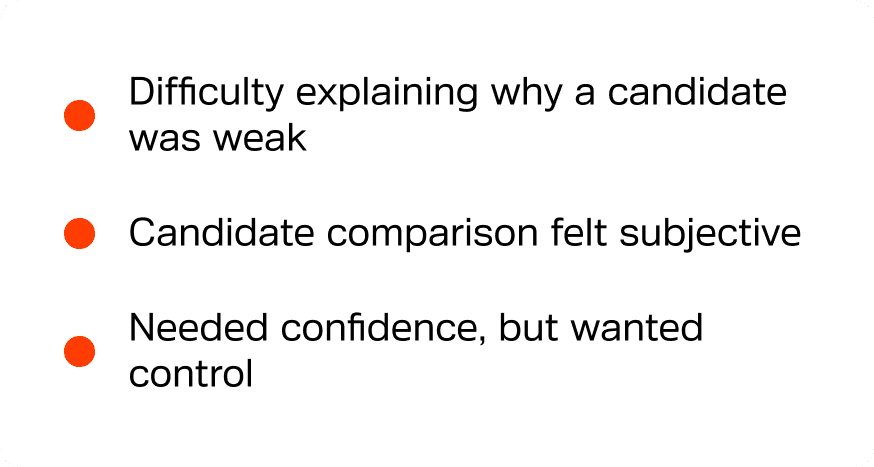
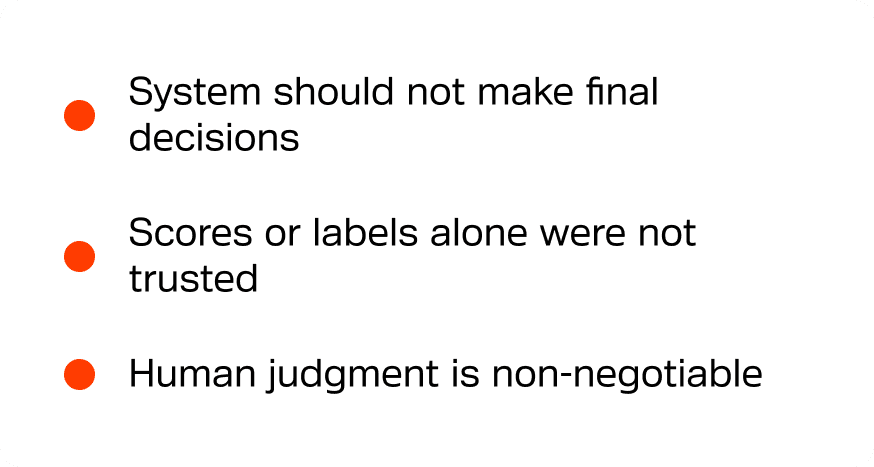
What focus group study revealed


Key Insight


I used a frame work called tension. I derived tensions by looking for conflicts between user behavior and desired outcomes.
◍ From research, I saw that recruiters prefer conducting interviews in a natural, conversational way — that’s how they think and evaluate candidates.
◍ But at the same time, they were struggling with consistency and clarity in decision-making, which requires structure.
So that created a clear tension:
👉 Natural conversation vs structured evaluation.
I use this method often — I look for situations where two valid needs can’t be fully satisfied at the same time. Those tensions help define the solution space.
⚖️ Tension 1
📍User behavior
Recruiters work in a conversational, unstructured way
But the output needs to be structured
→ This led to the tension: Natural flow vs structured evaluation
⚖️ Tension 2
📍User insights
Recruiters want AI support but don’t want to lose control
→ This led to the tension: AI assistance vs human control
⚖️ Tension 3
📍Goals
Hiring is slow, but decisions need to be accurate
→ This led to the tension: Speed vs confidence
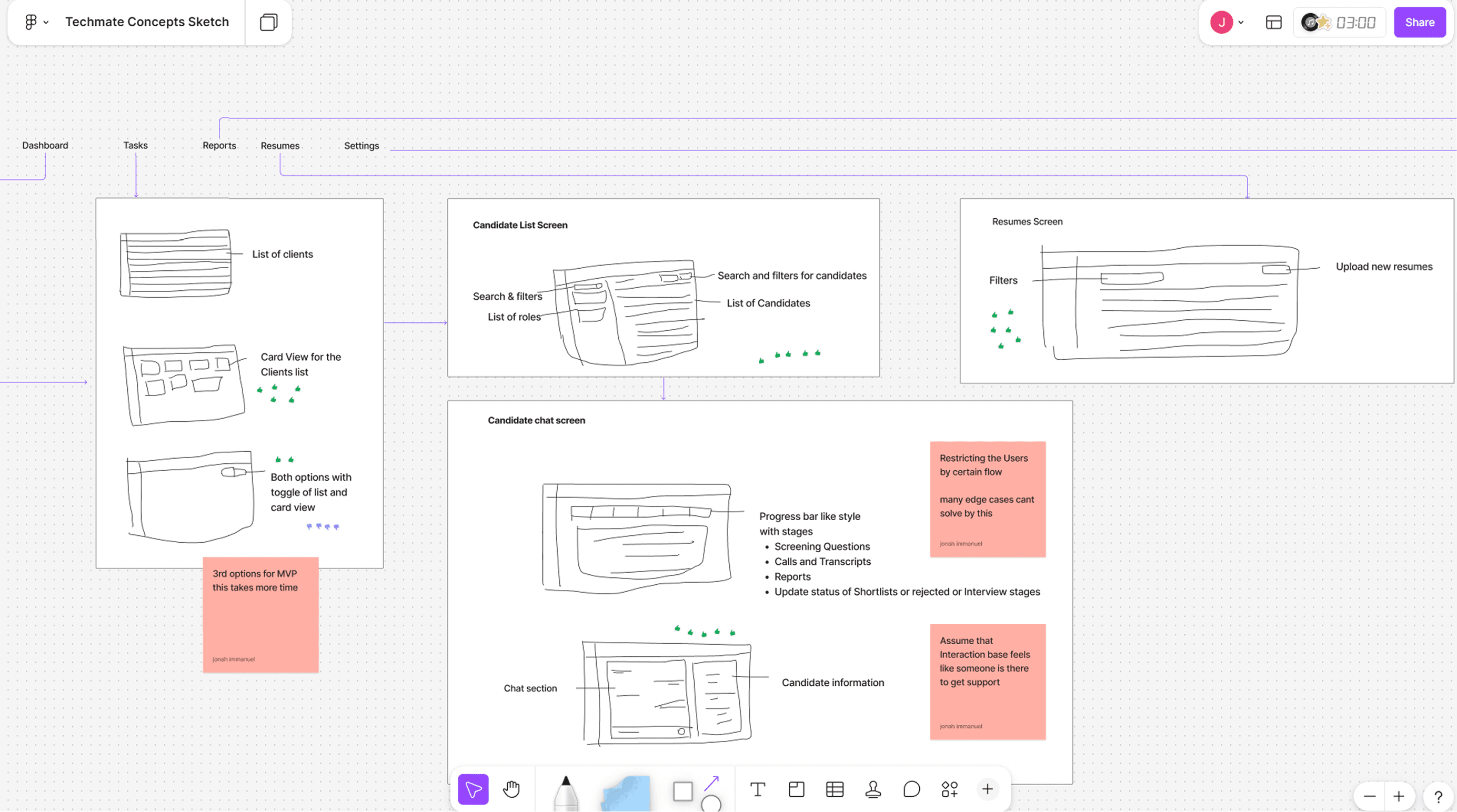
To understand the design space, we explored multiple directions by intentionally pushing different sides of these tensions of approaches to achieve the defined capabilities in different ways.

Solution 1

Solution 2
Solution 3
Real-time AI Co-pilot
AI actively supports recruiters during live screening by:
◍ Providing real-time evaluation signals
◍ Suggesting follow-up questions
◍ Generating instant insights
Capability Focus
Faster understanding of candidate relevance
Immediate decision support
Cons:
Increased intrusion during conversations
Reduced trust due to real-time AI influence
High technical complexity for MVP
Instead of fully committing to a single direction, we combined the most valuable aspects from multiple explorations:
What We Included:
Providing suggested screening questions
→ To support, not enforce, structured interviews
Mapping JD vs CV (relevance signals)
→ To help recruiters quickly understand candidate fit
Analyzing interview recordings and inputs
→ To extract structured insights without interrupting the conversation
Generating clear, explainable evaluation outputs
→ To improve recruiter confidence and client communication
🎯 Why This Direction
Instead of optimizing for a single dimension, we composed a solution that balances assistance, flexibility, and feasibility.
This direction was chosen because it:
Preserves natural recruiter workflows (no interruption during conversations)
Introduces structure at the decision stage, where clarity matters most
Enhances confidence without enforcing rigid systems
Delivers maximum value within MVP feasibility constraints
We deliberately combined post-interaction intelligence + lightweight guidance + relevance signals,
while trading off real-time assistance and fully structured interview control.
What we prioritized:
◍ Clarity in evaluation
◍ Recruiter confidence
◍ Ease of adoption
◍ Feasibility for MVP
What we consciously gave up:
● Instant, real-time AI feedback
● Fully guided or standardized interview flows
● Maximum automation
🧩 Outcome on Product Experience
These trade-offs directly shaped the final product:
AI operates asynchronously (after interaction)
Recruiters maintain full control over conversations
System provides structured insights without enforcing structure
Screening becomes clearer, faster, and more explainable
AI acts as a decision-support layer, not a replacement system
Design
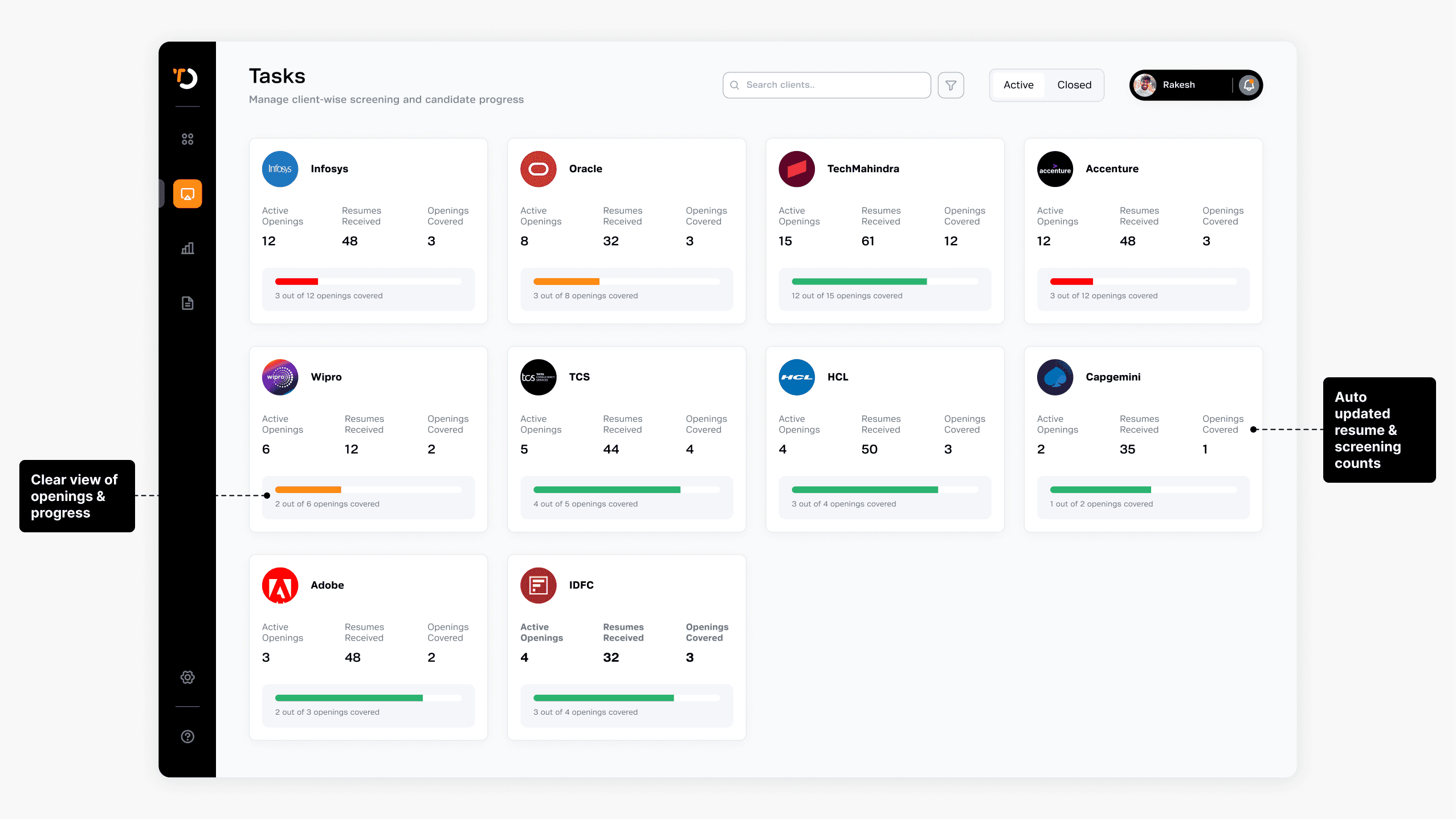
Client dashboard — single system of record
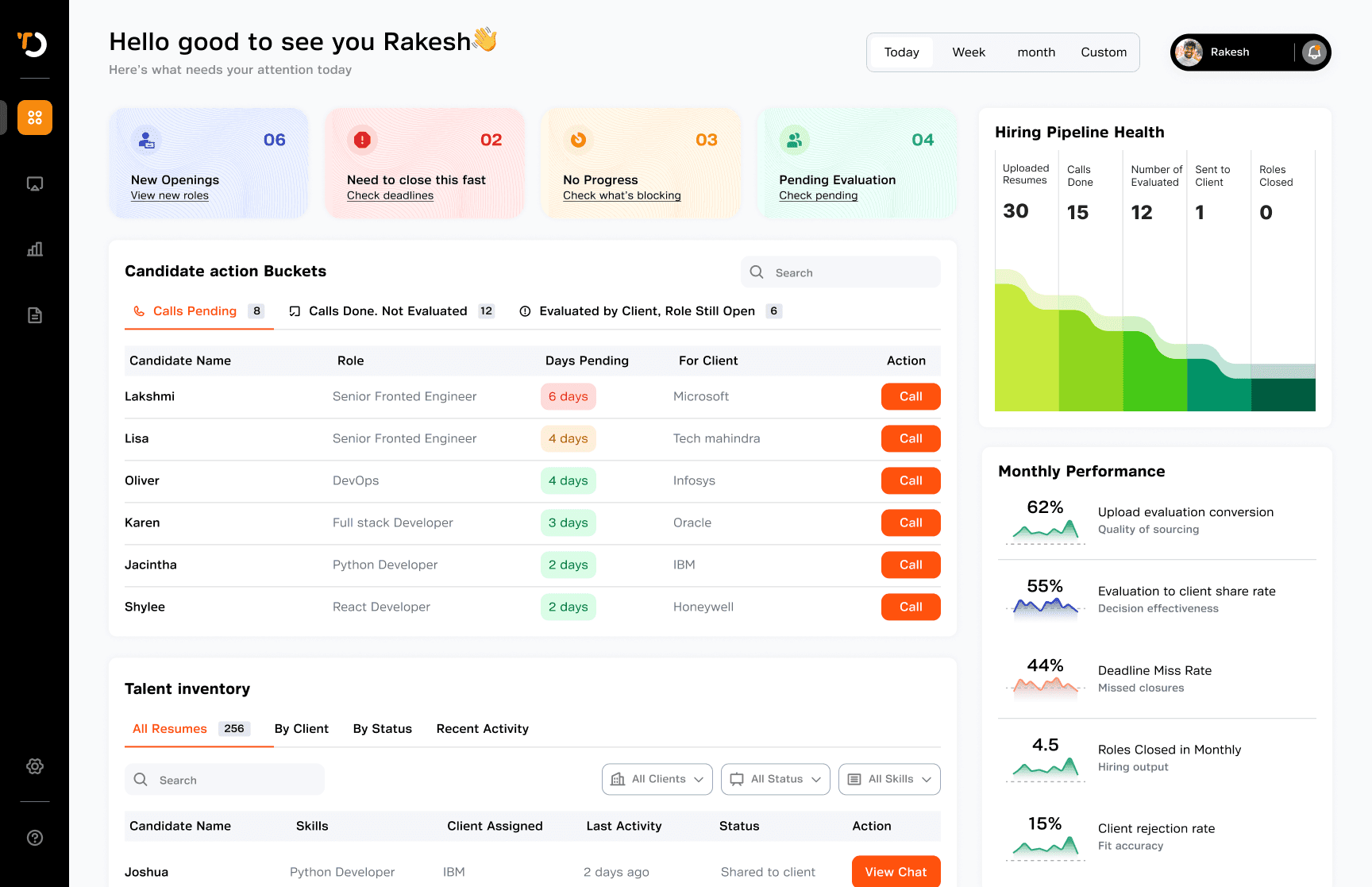
Recruiters managed client work across emails, Excel, ATS, and notes, so progress mostly lived in their heads. We introduced the Client Dashboard — a single place with structured client cards and auto-updated counts. Now recruiters can quickly see openings, screened candidates, and overall progress. This improved pipeline visibility helped recruiters stay aligned on role priorities and screening status, enabling more structured coordination before submissions were made to clients.
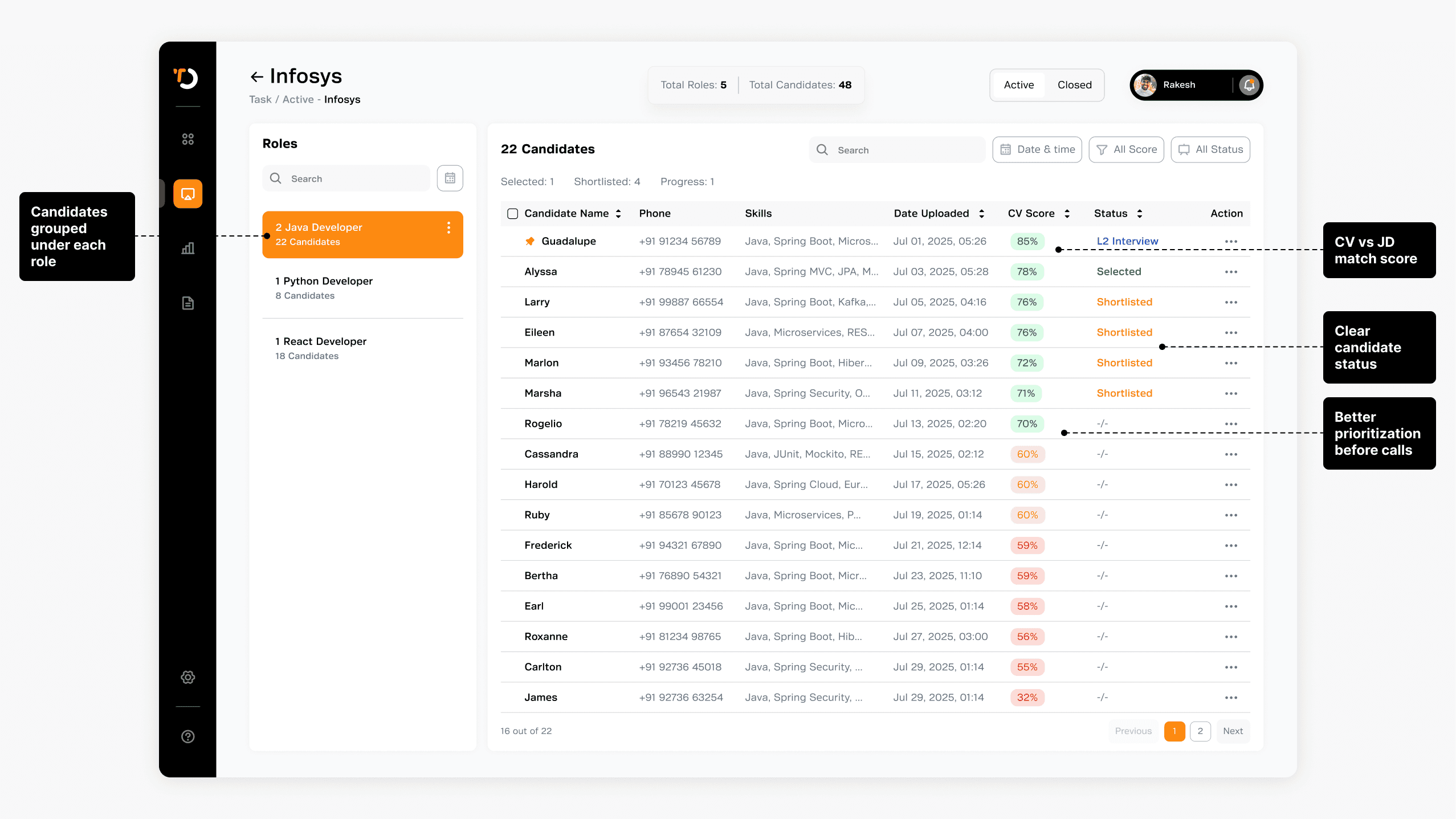

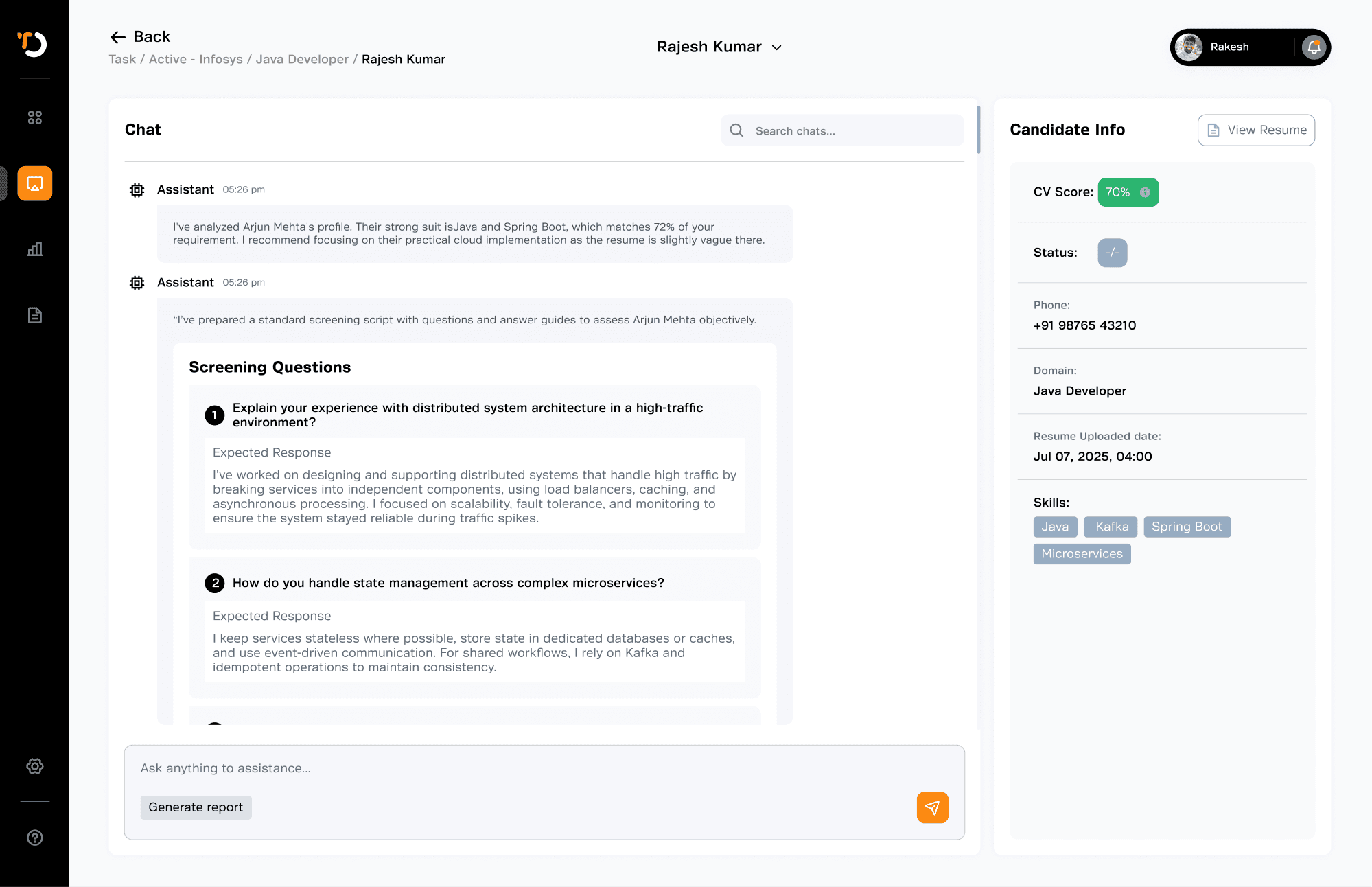
Once we had the initial solution in place, I tested it with recruiters to validate whether it actually worked in real screening scenarios.
Early positives
◍ 5 out of 8 recruiters (62%) mentioned they still preferred taking notes in a notebook during live calls, indicating a continued reliance on familiar behaviors during conversations.
◍ 8 out of 8 recruiters (100%) said the AI-generated report helped them better understand candidate fit and increased their confidence while submitting candidates to clients.
◍ 7 out of 8 recruiters (87%) found that AI-generated questions, reports, and centralized candidate information reduced cognitive load and made the screening process easier to manage.
The testing confirmed that recruiters valued AI as a supporting layer for clarity and increased their confidence.
What Didn’t Work
Still needed paper & other medium to take notes
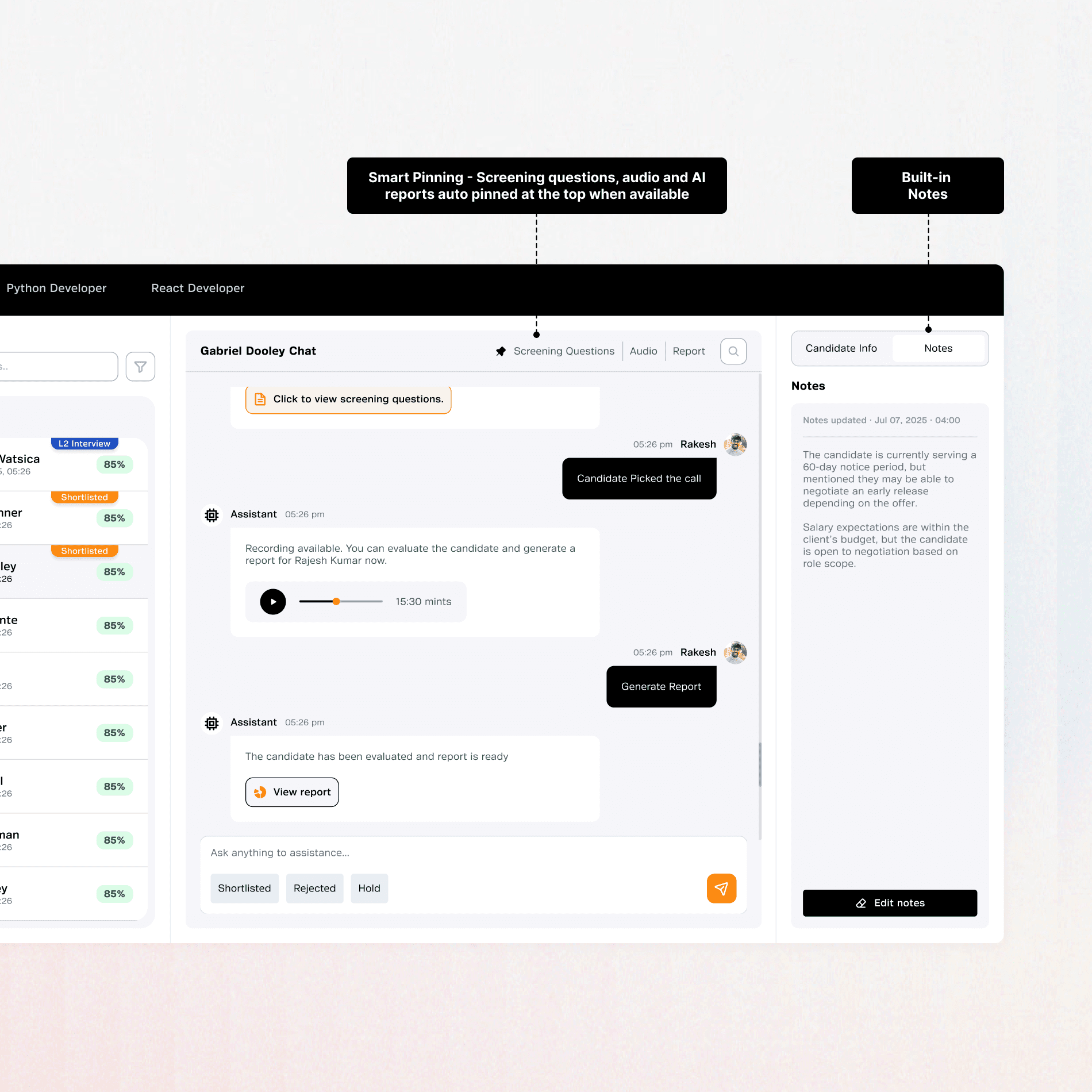
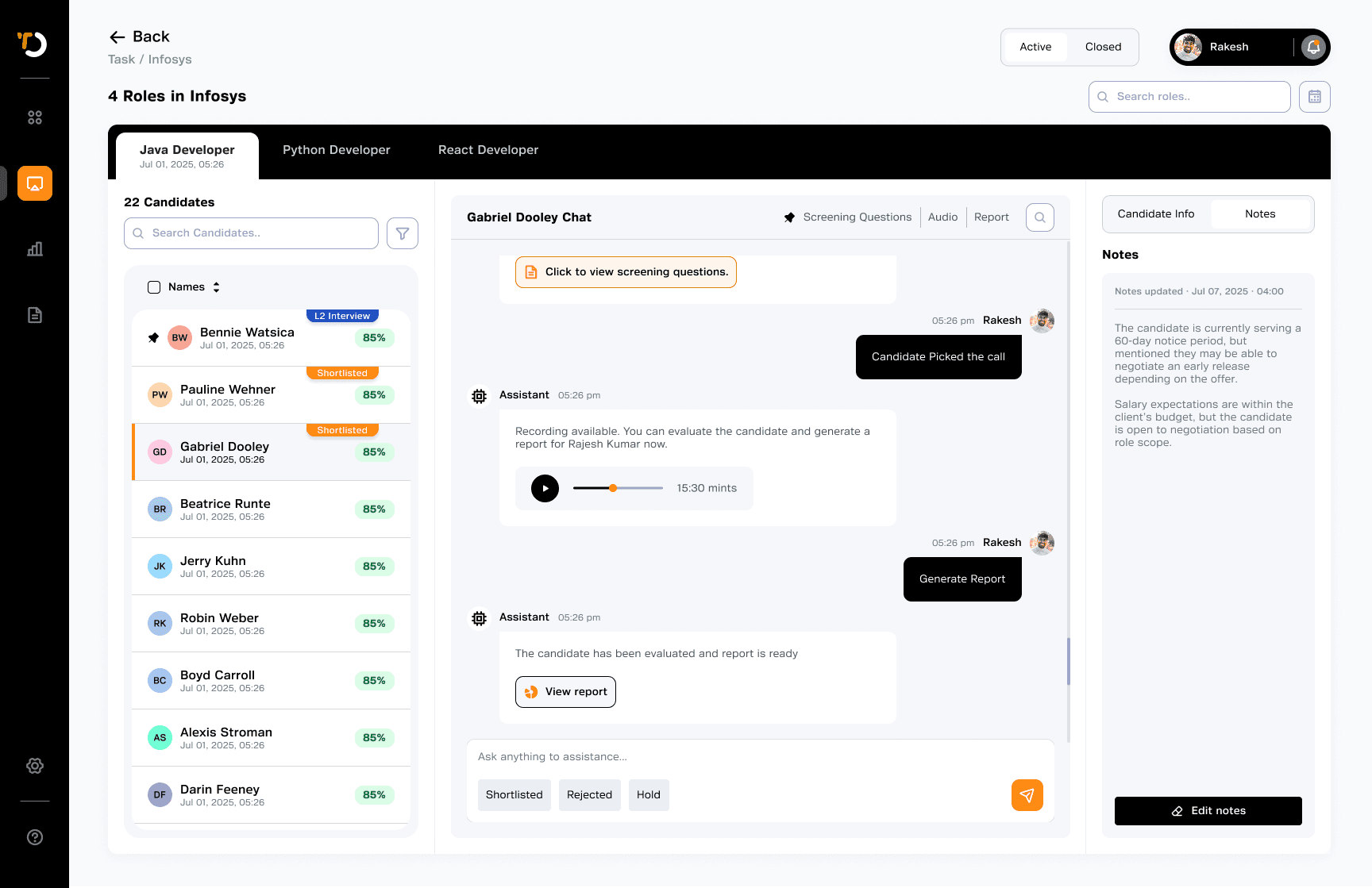
One major issue we saw was around note-taking. Even with the system, some recruiters preferred writing notes on paper or Excel instead of the chat. They worried that if they pressed Enter, the AI respond and interrupt their focus during the call. Another concern was that if they had a long conversation with the AI, their notes could get buried in the chat, making them harder to find later.
What Didn’t Work
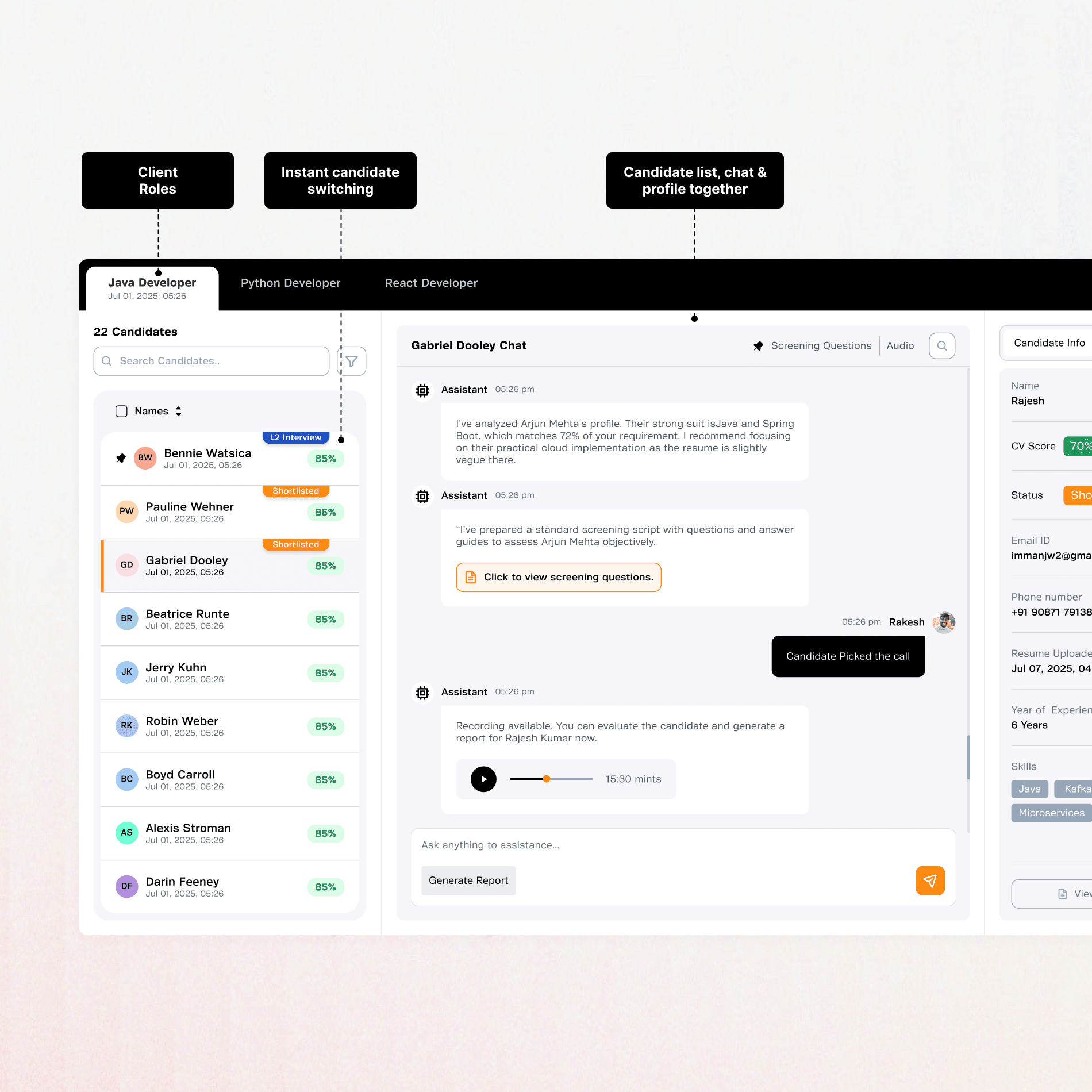
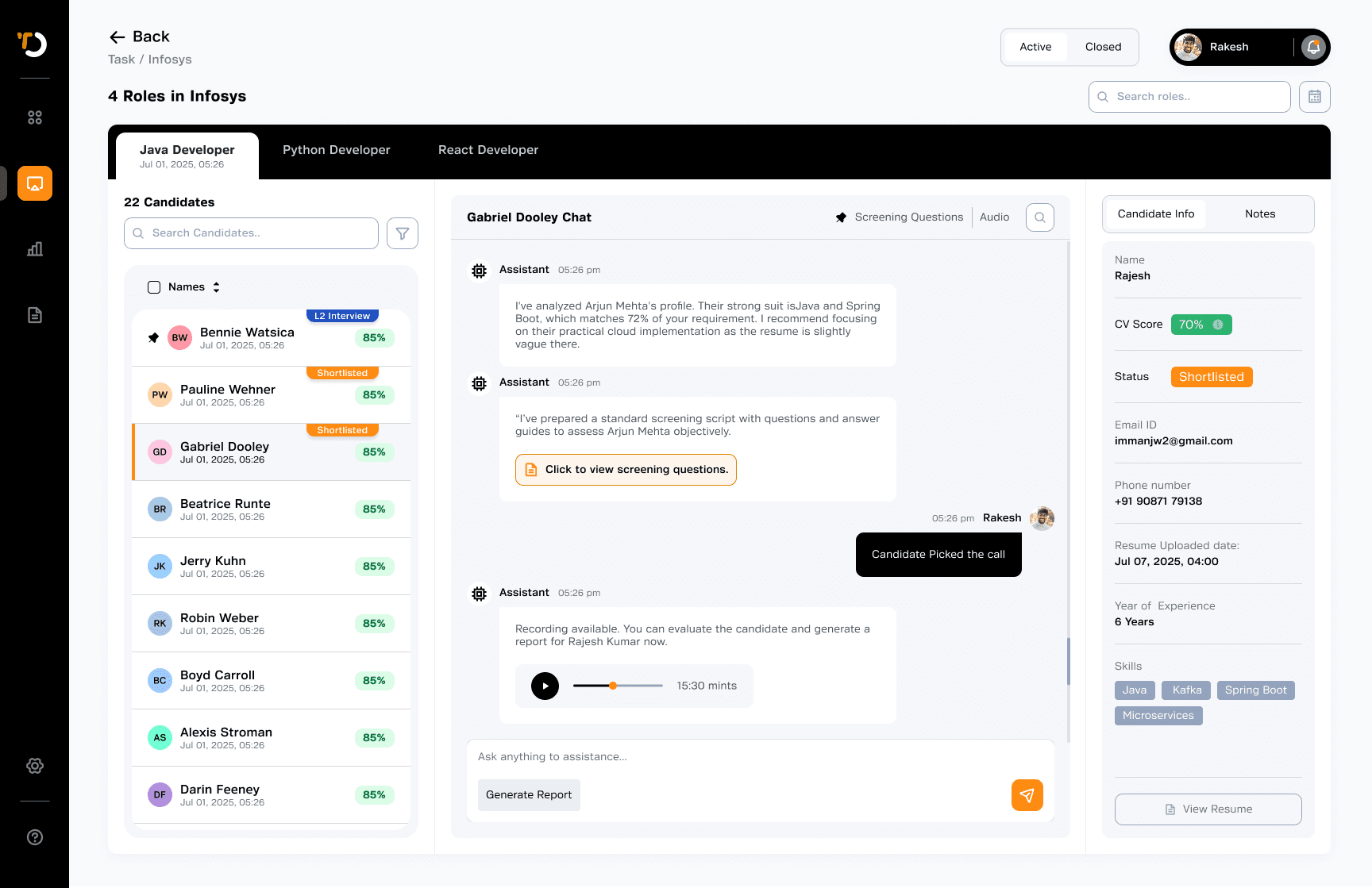
Status updates took too many steps, and switching between candidates was difficult.
Updating candidate status was slow. Recruiters had to open the profile and come back each time, which felt tiring during back-to-back calls. Switching between candidates also took too many steps.
What Didn’t Work
Screening questions get lost in chat
One subtle but important issue was inside the chat itself.After long conversations, screening questions, reports or audios moved far up in the chat.
Final changes

Impact
This led to faster closures, higher recruiter confidence, and greater client trust.